 Parked Prompts
A prompt is an instruction. So it gets treated like one.
How Parked Prompts keeps prompts from sending themselves, and why prompts from Git have to be read first.
Why it matters
A prompt tells an AI agent what to do, and agents can edit files and run commands. So a saved prompt deserves the care you'd give a script, especially one that came from someone else.
Nothing sends itself
- Restoring only fills the input. The commands it calls have flags that decide this, and in the Agents window leaving the flag out would send. Tests pin down the exact arguments.
- The agent can't send. In the canvas, every action that sends or arms a prompt is only available to the page, not offered to the agent as a tool. It can save a draft, which you then review.
- Marking a prompt done cancels it. Anything armed is checked again at the moment it would send: still parked, still confirmed, and still there.
- A prompt sends once. If saving its status fails after it has gone, it's reported instead of being sent again.
Prompts from Git
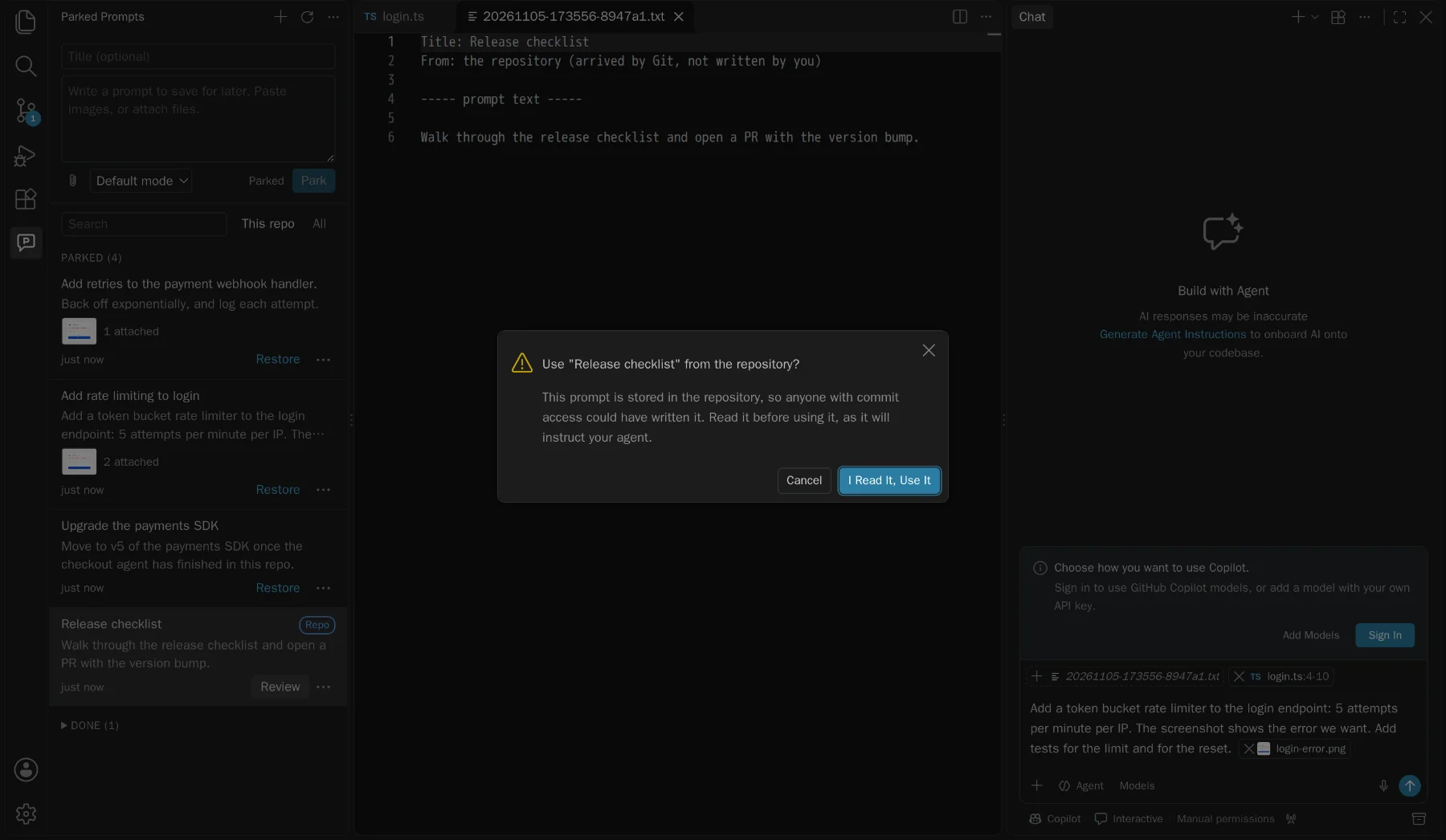
Anyone with commit access can add a file to .github/parked-prompts/, and it would instruct your agent. So these are treated as untrusted:
- You read it first. It opens read-only, and needs a yes before it can be restored, sent, armed, or run in a worktree.
- Hidden characters are shown. Zero-width, bidirectional, and tag characters can hide instructions from you while a model still reads them, so the preview marks them, as in
[U+200B]. - A yes covers that exact content: the text, the attachments' bytes, and the files it refers to. If a pull changes any of them, it asks again, even if the prompt was already armed.
- Your yes is stored outside the repository, in your home folder, so a pull can't approve itself.
- Untrusted workspaces hide them entirely in the editor, and the worktree and move actions are off.
Files and paths
- Attachments can't leave their folder.
.., absolute paths, and symlinks pointing out are blocked, and a blocked one is reported rather than attached. - The repo store can't be a symlink. A repository controls its own
.githubfolder, so a link there could send reads and writes anywhere. Those prompts aren't used. - Finding the repository doesn't run Git. It reads the files instead, because a repository's config can make Git run commands. Git only runs for a worktree, in a trusted workspace, after you confirm.
- Credentials are stripped from remotes, so a token in a clone URL is never saved.
The sidebar and canvas
- Prompt text can't become markup. It's only ever inserted as text, under a strict Content-Security-Policy, and tests try to inject script through it.
- The canvas listens on 127.0.0.1 only, with a token for each launch, because it serves your private screenshots. The page asks for images by ID and never names a path.
What's on disk
Personal prompts are in ~/.parked-prompts, private to your user on macOS and Linux. They aren't encrypted, so other software running as you can read them, like most files in your home folder. Nothing is sent anywhere until you send it, and this website collects nothing about you: it has no analytics or cookies.
When moving a prompt to a repository, the secret check is a helpful net, not a guarantee. Read what you commit.
How it's released
Each release is built and tested in GitHub Actions, and a person approves it. It's published with Trusted Publishing, so there's no long-lived Marketplace token that could leak: each run gets a credential that lasts 15 minutes. Every package is checked against an exact list of files before it goes out.
Report a problem
Please use private vulnerability reporting rather than a public issue.