
Part 03: Referencing Code Files in Chat
In this section, you’ll learn how to reference existing code files in your chat conversations.
Add the relevant files to context
Section titled “Add the relevant files to context”-
Open the Products.razor again from the Store project.
-
Ensure that GitHub Copilot Chat is open by clicking on the Github Copilot Chat in the top-right corner of Visual Studio and select Open Chat Window or press
Ctrl+\+Cif Copilot chat isn’t open.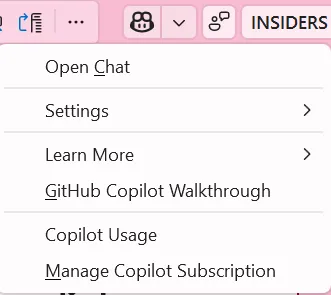
-
Start a new chat by clicking the
+icon in the top right corner of the chat window.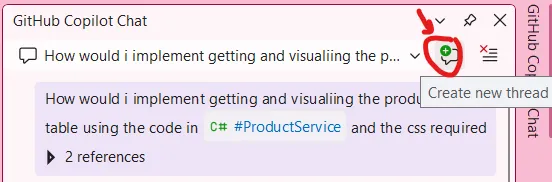
-
Change the mode to
Ask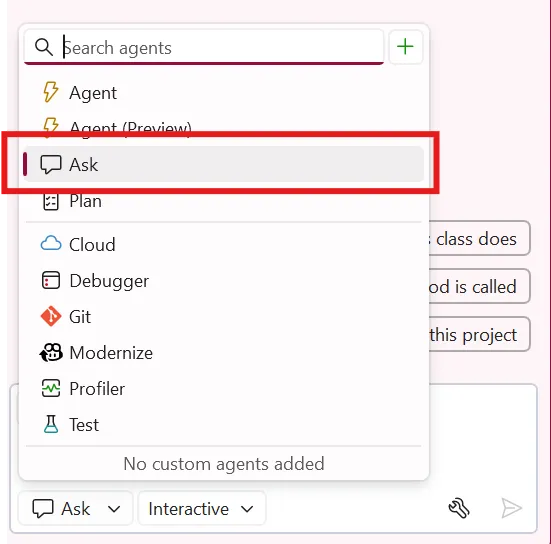
Ask a project-aware question
Section titled “Ask a project-aware question”- Type:
#ProductService.csto reference the ProductService file. - Ask:
How would I implement getting and visualizing the products in a table using the code in #ProductService and the css required. - Review the code suggestion but don’t implement it yet.
- Notice how Copilot can reference existing code to provide contextual suggestions.
Key Takeaway: Referencing files in your chat provides Copilot with the context it needs to give more accurate, project-specific suggestions.
Back: Part 02 - Enhancing UI with Inline Chat | Next: Part 04 - Using Custom Instructions